Booking a ride should not depend on whether your wheelchair folds. That is the idea behind Uber WAV, the rideshare product built for riders who use wheelchairs and other mobility devices. Uber describes WAV as a way to connect riders with drivers whose vehicles can accommodate a wheelchair, including vehicles equipped with ramps or lifts. Accessible rideshare has improved, but it still works differently from a standard Uber request, and understanding those differences before you book saves a lot of frustration at the curb.
This guide walks through what Uber WAV is, which devices Uber says it accommodates, how to turn on the accessible ride option in the app, and what to do when an accessible vehicle is not nearby. It also covers the practical side that riders care about most: how to plan a trip, what to confirm with the driver, and what to look at if you need an accessible vehicle of your own.
What Uber WAV Actually Is
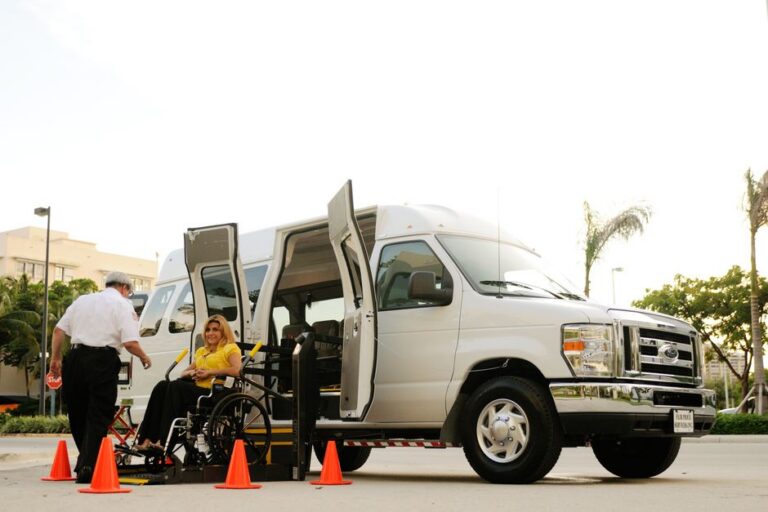
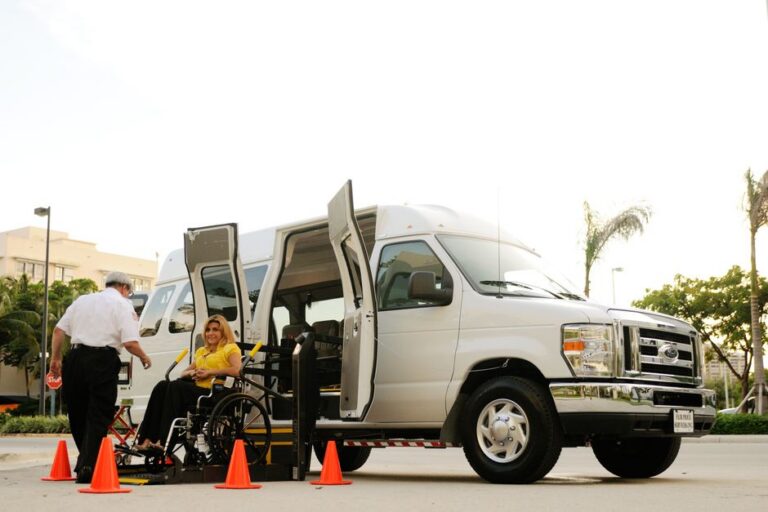
Uber WAV is a ride option rather than a separate company. When a rider selects the WAV option, Uber connects that request to a driver with a vehicle that can carry a wheelchair. According to Uber, those vehicles are equipped with ramps or lifts, which is the key difference from a standard car. A ramp or lift makes it possible to board without transferring out of a wheelchair and folding it into a trunk.
Uber also states that UberWAV drivers have completed a special training course. That training matters because loading a wheelchair into a vehicle is not the same as helping someone into a passenger seat. The details of that course are published by Uber, so if you want specifics on what drivers learn, Uber’s driver pages are the right place to check.
Which Mobility Devices Uber Says It Welcomes
Uber’s accessibility guidance is broader than wheelchair users alone. Uber states that it welcomes wheelchairs, walkers, canes, and other mobility devices. The company also notes that drivers are expected to accommodate riders using walkers, canes, folding wheelchairs, or other assistive devices. That expectation applies across ride types, not only to WAV requests.
In practice, riders fall into a few groups, and the ride option that fits depends on the device:
- Canes and walkers. These typically travel in a standard Uber without any special request. Uber’s guidance says drivers should accommodate them.
- Folding wheelchairs. A folding wheelchair can often be stowed in a standard vehicle, and Uber’s guidance includes folding wheelchairs among devices drivers are expected to accommodate.
- Non-folding motorized wheelchairs. These need a vehicle with a ramp or lift, which is where Uber WAV comes in. Uber’s own announcement about WAV describes it as a way for riders who use non-folding motorized wheelchairs to connect with drivers in wheelchair accessible vehicles.
The device you use determines whether you need to request WAV or can book a standard ride. If there is any doubt, request the accessible option rather than hoping a driver can manage a device that does not fold.
How to Request a Wheelchair Accessible Uber
The WAV option does not always appear by default. Uber’s rider help documentation explains that requesting a wheelchair accessible vehicle requires activating the UberACCESS product in your app. According to that guidance, you go to the Payment tab and select Add, then follow the prompts to add the product. Once UberACCESS is active, the accessible ride option becomes available when you enter your trip details.
Step by Step in the App
- Open the Uber app and go to the Payment tab.
- Select Add and follow the prompts to activate UberACCESS.
- Enter your pickup and dropoff locations.
- Look for the wheelchair accessible option among the ride choices.
- Confirm the request and check the vehicle details when a driver accepts.
App menus change over time, and the exact wording can differ between regions and app versions. Uber’s rider help article on accessible service requests is the most reliable reference if the option does not appear where you expect it. A quick check there before a time-sensitive trip is worth the two minutes.
Folding and Non-Folding Wheelchairs Are Not the Same Trip
This is the detail that trips up the most riders. A folding manual wheelchair and a non-folding motorized wheelchair create two different transportation problems. A folding chair can go into a trunk or cargo area, which means a standard Uber can work. A non-folding motorized wheelchair cannot be collapsed, so it needs a vehicle with a ramp or lift and enough interior space to carry both the rider and the chair.
Uber WAV exists to solve the second problem. If you use a motorized wheelchair that does not fold, treating a standard ride as an option usually ends with a driver arriving and being unable to load you. Requesting WAV from the start avoids that outcome.
Why Driver Training Matters
Uber states that drivers who provide WAV trips have completed a special training course. Loading and securing a wheelchair is a skill. It involves positioning the chair correctly, using the ramp or lift safely, and making sure the rider is secure before the vehicle moves. A driver who has been through training is more likely to handle that process smoothly and without rushing.
For riders, the practical takeaway is simple. If you have questions about how a driver will load your specific chair, raise them before the trip or through Uber’s support channels. Uber publishes accessibility information for riders, and that is the authoritative source for how the program is supposed to work.
When No Accessible Vehicle Is Nearby
WAV availability depends on whether a trained driver with an accessible vehicle is on the road near you at that moment. That supply is not the same in every city or at every hour, and it can be tighter during peak times and late at night. Uber does not publish a guarantee that a WAV will always be minutes away, and riders in some areas report waiting longer than they would for a standard ride.
A few habits help when supply is thin:
- Request earlier than you would for a standard ride, especially for appointments with fixed start times.
- Check the app before you need the trip so you know whether the option is showing in your area.
- Keep a backup plan for essential trips, whether that is a family member, a local transit service, or a scheduled medical transport.
- Contact Uber support if the accessible option does not appear at all, since the UberACCESS product may need to be activated on your account.
Riders in online wheelchair communities frequently ask about alternatives for exactly this reason. The honest answer is that accessible rideshare works well in some places and is thin in others, so having a second option is not pessimism, it is planning.
Preparing for the Trip Itself
Once a WAV driver accepts, a few preparations make the pickup smoother. Be ready at a spot where a vehicle with a ramp or lift can pull over safely and where the ramp can deploy without landing on a curb, a planter, or a slope. If your building has a porte-cochere, a loading zone, or a wide driveway, that usually works better than a narrow street entrance.
Let the driver know what to expect if the app offers a way to send a note, particularly if you use a larger power chair. Confirm the pickup point in a message so the driver is not searching. If you travel with an attendant or a service animal, mention it in advance where possible. Small details like these cut down on the awkward minutes at the curb and reduce the chance that a driver decides the trip is not workable.
Beyond Rideshare: Accessible Vehicles You Own or Manage
Rideshare solves some trips, but it does not replace a vehicle you control, and it is not a fit for every schedule or every destination. Riders who need reliable daily transportation often look at a personal accessible vehicle instead. That route looks different from buying a car off a lot.
At My Mobility Center, the wheelchair accessible vehicle program works a specific way. The company does not sell converted minivans. Instead, the customer buys a high-roof van from a dealer in their own name, and My Mobility Center installs the lift and the wheelchair securement system afterward. That keeps the vehicle purchase and the conversion in the customer’s hands while the accessibility work is handled by technicians who do it every day.
The same team handles other vehicle modifications, including scooter and wheelchair lifts, hand controls, left foot accelerators, passenger brakes, and transfer and turny seats. For organizations, the work extends to fleet wheelchair lift preventive maintenance, securement service, bus air conditioning, ADA compliance audits, and Wheelchair Lift Operational Safety Training. My Mobility Center has done this work since 1990, is family-owned, and the current owners bought the company in 2024. It is an authorized dealer for more than 40 manufacturers, operates in 32 states with its own mobile technicians, and has a showroom in Athens, Georgia, with more opening.

Questions Worth Asking Before You Book
Whether you are booking a ride or shopping for a van, the same instinct applies: get the specifics in writing before you commit. A few questions cover most of the gaps.
- Does the vehicle have a ramp or a lift, and which one fits my chair?
- Can the driver confirm the weight and width limits of the equipment?
- Where exactly will the vehicle stop, and is that spot ramp-friendly?
- If this is a purchase, who installs the lift and who services it later?
- What does maintenance look like over the life of the equipment?
Uber does not publish detailed weight and dimension limits for WAV vehicles in the material reviewed here, so those answers need to come from the driver, the app, or Uber support directly. On the ownership side, a mobility equipment provider can measure your chair against a specific lift before anything is installed, which removes the guesswork entirely.
Frequently Asked Questions
How do I request a wheelchair accessible Uber?
Activate the UberACCESS product in your app first. Uber’s rider guidance says to open the Payment tab, select Add, and follow the prompts. Once UberACCESS is active, the wheelchair accessible option appears among your ride choices when you enter a pickup and dropoff. If it does not appear, check Uber’s accessible service requests help article or contact Uber support for your area.
Does Uber accommodate folding wheelchairs and walkers?
Yes. Uber states that it welcomes wheelchairs, walkers, canes, and other mobility devices, and that drivers are expected to accommodate riders using walkers, canes, folding wheelchairs, or other assistive devices. If your chair folds, a standard ride may work. Non-folding motorized wheelchairs need a vehicle with a ramp or lift, which means requesting WAV.
Are Uber WAV drivers trained?
Uber states that UberWAV drivers have completed a special training course. The course details are published by Uber rather than by riders, so the driver and Uber’s own driver pages are the best sources if you want to know what the training covers. Training does not replace a conversation about your specific chair before the trip.
What if no wheelchair accessible vehicle is available?
Availability varies by city and time, so there is no guarantee a WAV will be nearby when you request one. Book earlier than usual for fixed appointments, confirm the accessible option shows in your app, and keep a backup plan for trips you cannot miss. If the option never appears, Uber support can check whether UberACCESS is active on your account.
Will insurance or Medicare pay for rideshare trips?
The material reviewed here does not establish how insurers or Medicare handle rideshare fares, and coverage rules differ by plan and purpose of the trip. Rather than assume, ask your insurance provider or Medicare directly and confirm in writing before you rely on reimbursement. Uber’s help pages can clarify what documentation is available for your trips.
Accessible transportation in 2026 is a mix of options, and no single one covers every rider. Uber WAV handles the trips where a trained driver with a ramp or lift vehicle is available. A personal accessible van handles the rest, and the two are not competitors so much as different tools for different days. Whichever you rely on, confirming the details in advance is what keeps the trip predictable.